
If you've ever wondered how applications pull live data-like weather, stock prices, or news headlines they do it by talking to an API (Application Programming Interface).
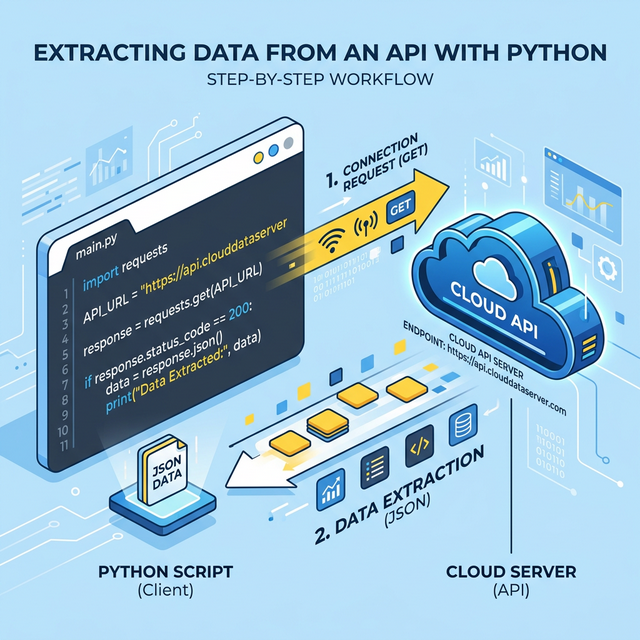
In this tutorial, you will learn exactly how to connect your Python scripts to a modern REST API to fetch live data from a server. We use News API (a free service) as our playground, but the underlying mechanics we build apply to almost any API you will encounter in the wild.
Chat prompts: I will be adding chat prompt hints throughout the tutorial to help you explore more detailed concepts related to what we are implementing. Use the
Chat Windowin your IDE to help you understand.
In This Tutorial, You'll Learn How To
By the end of this tutorial, you will understand how to:
- Connect to a modern REST API using Python's famous
requestslibrary. - chat prompt:
what is the python request library and how does it work? - Handle and parse JSON data into accessible Python dictionaries.
- chat prompt:
what is JSON data and how does Python's dictionary relate to it? - Securely manage API keys using environment variables so you don't leak passwords.
- Format URLs with Query Parameters to filter the exact news articles you want.
- Implement basic Error Handling to check HTTP Status Codes and prevent crashes.
- Use Type Hints to make your functions predictable, readable, and easier to debug.
- chat prompt:
explain the basics of Python type hints introduced in PEP 484
[!NOTE] We purposefully will not be using the official Python client library provided by NewsAPI. By writing the connection ourselves, you will learn the underlying mechanics of how any API connection works in Python.
Prerequisites
Before we start writing code, ensure you have the following:
- An Active API Key:
- Create a free account at newsapi.org.
- Grab your unique API key from your account dashboard.
- Python 3.8+ installed on your machine.
- A terminal or command prompt ready to go.
Step 1: Set Up Your Project Environment
It is a best practice to keep your Python projects isolated from one another. We do this using Virtual Environments. Let's set up a clean workspace.
- Activate your virtual environment (
venv). Open your terminal and run either of the following based on your Operating System:
Windows (PowerShell):
python -m venv venv
venv\Scripts\activate.bat
macOS/Linux (Shell):
python3 -m venv venv
source venv/bin/activate
-
chat prompt:
why is it a best practice to use a virtual environment like venv in Python? -
Install our dependencies:
We need two essential third-party libraries for this project. requests to handle the web traffic, and python-dotenv to handle our secret API keys securely.
Terminal:
pip install requests python-dotenv
-
chat prompt:
what is pip and how does it manage third-party packages in Python? -
Create a
.envfile:
[!CAUTION] You should never hardcode passwords or API keys directly in your Python code where someone else could find them (like if you upload your code to GitHub).
In the same folder you are working in, create a new file named exactly .env (don't forget the dot at the beginning). Open it, and paste your key inside like this:
NEWS_API_KEY=your_newsapi_org_key_here
(Make sure to replace your_newsapi_org_key_here with the actual key you got from the website).
Step 2: Grasp the 6 Core Python Concepts
Before writing the script, let's briefly review the tools and concepts we are about to use. Don't worry if this sounds a bit overwhelming right now; we'll see them in action soon!
- HTTP Requests (
requestslibrary): This is how Python talks to the internet. To grab news articles, we use an HTTP GET request to pull data from an API Endpoint. - JSON Data Handling: NewsAPI.org formats its data as a giant string of text called JSON. We need to parse that JSON into Python dictionaries to extract titles and links.
- Environment Variables (
osanddotenv): We will use thepython-dotenvlibrary to securely load the key from our.envfile into our script. - Query Parameters: When asking for articles, we add requirements (like keywords or dates) directly to the URL. These are known as query parameters (e.g.,
?q=technology&language=en). - Basic Error Handling (
try/except): We need to check if the server responded successfully (200 OK) and handle errors gracefully. - Type Hints (
typingmodule): Introduced in Python 3.5, type hints allow you to define exactly what type of data your functions expect to receive and what they will return. This makes your code self-documenting and helps IDEs catch bugs before you even run the script.
Step 3: Secure Your Environment Variables
Now it's time to write some code! Create a new file named api_connect.py.
The first thing we need to do is import our tools and load our API key. We want to ensure our script has access to the .env file before it tries to do anything else.
Python: api_connect.py
import os
from typing import Any, Dict, List

import requests
from dotenv import load_dotenv

# --- Configuration & Constants ---
NEWS_API_URL = "https://newsapi.org/v2/everything"
REQUEST_TIMEOUT = (5, 15)  # (connect, read) timeout in seconds

# Load environment variables securely
load_dotenv()
API_KEY = os.getenv("NEWS_API_KEY")
- chat prompt:
explain how os.getenv() works and why it is safer than hardcoding variables
In this block, load_dotenv() finds our .env file and quietly loads it into memory. Then, os.getenv("NEWS_API_KEY") looks for that specific variable name and assigns it to our API_KEY constant.
We also defined REQUEST_TIMEOUT as a tuple. This tells the requests library to wait up to 5 seconds to connect to the server, and 15 seconds to read the data before giving up.
Step 4: Create the API Connection Function
Next, we'll write the function that actually talks to NewsAPI.org. We will pass it a topic (query) and tell it to return a list of dictionaries. Notice the extensive use of Type Hints in the function definition.
Add the following function to your api_connect.py file:
Python: api_connect.py
def fetch_news(query: str, language: str = "en") -> List[Dict[str, Any]]:
    """Fetch articles from NewsAPI based on a search term."""

    # Fail cleanly if the API Key is missing
    if not API_KEY:
        raise ValueError("NEWS_API_KEY not found. Check your .env file.")

    # Dictionary of URL Query Parameters
    params = {
        "apiKey": API_KEY,
        "q": query,
        "language": language,
        "sortBy": "publishedAt"
    }

    # Make the HTTP GET Request
    response = requests.get(NEWS_API_URL, params=params, timeout=REQUEST_TIMEOUT)

    # Check for HTTP errors (like 401 Unauthorized or 404 Not Found)
    response.raise_for_status()

    # Parse the JSON text into a Python Dictionary
    data = response.json()

    # Return just the list of articles, defaulting to an empty list
    return data.get("articles", [])
Let's break down the Pythonic principles at work here:
- Understanding the Type Hint: Look at
def fetch_news(query: str, language: str = "en") -> List[Dict[str, Any]]:. - We are explicitly stating that
querymust be a string (str). - The arrow
->tells us exactly what the function spits out: A List, containing Dictionaries, where the keys are strings (str) and the values can be anything (Any). - chat prompt:
how do Python type hints like List[Dict[str, Any]] improve code readability and IDE support? - Failing Early: By checking
if not API_KEY:immediately, we trigger a clearValueErrorrather than trying to connect and failing mysteriously. - The
paramsDictionary: Instead of building a messy URL manually, therequestslibrary accepts a clean dictionary and formats the Query Parameters for us safely. - Status Checking:
response.raise_for_status()guarantees that if the server denied our request for any reason, the script halts and throws an error we can catch later.
Step 5: Process and Display the Data
We successfully fetched the data, but it's currently a massive list of Python dictionaries. Let's write a small helper function to print the headlines cleanly to the terminal.
Add this function to your file:
Python: api_connect.py
def show_headlines(articles: List[Dict[str, Any]]) -> None:
    """Display news headlines cleanly in the terminal."""

    if not articles:
        print("No news found for the given query.")
        return

    print(f"\nFetched {len(articles)} headlines:\n" + "="*30)

    for article in articles:
        # Provide a default "No Title" fallback if the dictionary is missing the key
        title = article.get("title", "No Title")
        print(f"• {title}")
There are two major concepts hidden in this short function:
- The
-> NoneType Hint: Notice that this function returns-> None. This means the function performs an action (printing to the screen) but doesn't hand any data back to the rest of the program. - The Early Return: Notice the pattern at the top:
if not articles: return. Instead of wrapping the entire loop in anifblock (which would unnecessarily indent all our code), we exit immediately if there's no data. Flat is better than nested. - chat prompt:
explain the "early return" pattern in Python and why it is considered better than deep nesting
Step 6: Putting It All Together
Finally, we need a main execution block to tie our functions together and catch any errors that might have slipped through. Add this to the very bottom of your script:
Python: api_connect.py
def main() -> None:
    """Entry point for the script."""
    try:
        articles = fetch_news("Artificial Intelligence")
        show_headlines(articles)

    except ValueError as val_err:
        print(f"Configuration Error: {val_err}")
    except requests.exceptions.Timeout:
        print("Network Error: The request timed out. Check your internet connection.")
    except requests.exceptions.RequestException as req_err:
        print(f"Network Error: {req_err}")

if __name__ == "__main__":
    main()
- chat prompt:
what does if __name__ == "__main__": mean in Python? - chat prompt:
explain how a try...except block catches network errors in Python
By wrapping our fetch_news() call in a try...except block, we ensure that if the internet cuts out or our .env is misconfigured, the user gets a polite, plain-English error message instead of a terrifying crash traceback.
The Final Script
If you followed the steps correctly, your final api_connect.py file should look exactly like this:
Python: api_connect.py
import os
from typing import Any, Dict, List

import requests
from dotenv import load_dotenv

# --- Configuration & Constants ---
NEWS_API_URL = "https://newsapi.org/v2/everything"
REQUEST_TIMEOUT = (5, 15)  # (connect, read) timeout in seconds

# Load environment variables securely
load_dotenv()
API_KEY = os.getenv("NEWS_API_KEY")

def fetch_news(query: str, language: str = "en") -> List[Dict[str, Any]]:
    """Fetch articles from NewsAPI based on a search term."""
    if not API_KEY:
        raise ValueError("NEWS_API_KEY not found. Check your .env file.")

    params = {
        "apiKey": API_KEY,
        "q": query,
        "language": language,
        "sortBy": "publishedAt"
    }

    response = requests.get(NEWS_API_URL, params=params, timeout=REQUEST_TIMEOUT)
    response.raise_for_status()

    data = response.json()
    return data.get("articles", [])

def show_headlines(articles: List[Dict[str, Any]]) -> None:
    """Display news headlines cleanly in the terminal."""
    if not articles:
        print("No news found for the given query.")
        return

    print(f"\nFetched {len(articles)} headlines:\n" + "="*30)
    for article in articles:
        title = article.get("title", "No Title")
        print(f"• {title}")

def main() -> None:
    """Entry point for the script."""
    try:
        articles = fetch_news("Artificial Intelligence")
        show_headlines(articles)
    except ValueError as val_err:
        print(f"Configuration Error: {val_err}")
    except requests.exceptions.Timeout:
        print("Network Error: The request timed out. Check your internet connection.")
    except requests.exceptions.RequestException as req_err:
        print(f"Network Error: {req_err}")

if __name__ == "__main__":
    main()
Running the Script
Once your .env file is ready and the libraries are installed, you must ensure your virtual environment is active before running the script. Open your terminal and run the activation command for your OS:
Windows (PowerShell):
venv\Scripts\activate.bat
macOS/Linux (Shell):
source venv/bin/activate
Now that you see (venv) at the beginning of your terminal prompt, execute the script:
Terminal:
python api_connect.py
You should see an output similar to:
Interactive REPL:
>>> python api_connect.py

Fetched 100 headlines:
==============================
• What is Artificial Intelligence?
• Google announces new AI model...
• Why AI is the future of Python...
Frequently Asked Questions (FAQ)
Q: Why do we pass timeout=REQUEST_TIMEOUT to the requests.get() function?
If the NewsAPI servers freeze, your Python script could sit entirely idle forever waiting for a response. Adding a timeout explicitly tells Python, "If you can't connect or read data within 15 seconds, cancel the request and throw a Timeout error."
Q: I am getting a 401 Unauthorized HTTP error. What does that mean?
This means NewsAPI.org does not recognize your API key. Usually, it's a typo in the .env file, or the load_dotenv() function isn't finding it. Double-check that your file is named exactly .env!
Q: How do I change the topic to fetch different news?
In the main() function, locate the line fetch_news("Artificial Intelligence"). Change the string to any topic you want, such as "SpaceX" or "Python Programming", and rerun the script!